
How to share content from other schools
Automatic translation. View original
With all your users
- Enter from the menu 'Publications' to videos, LIVEs, audios, etc
- Click on 'To share', above the publication table
- You will see the publications that other schools have made available to share with others
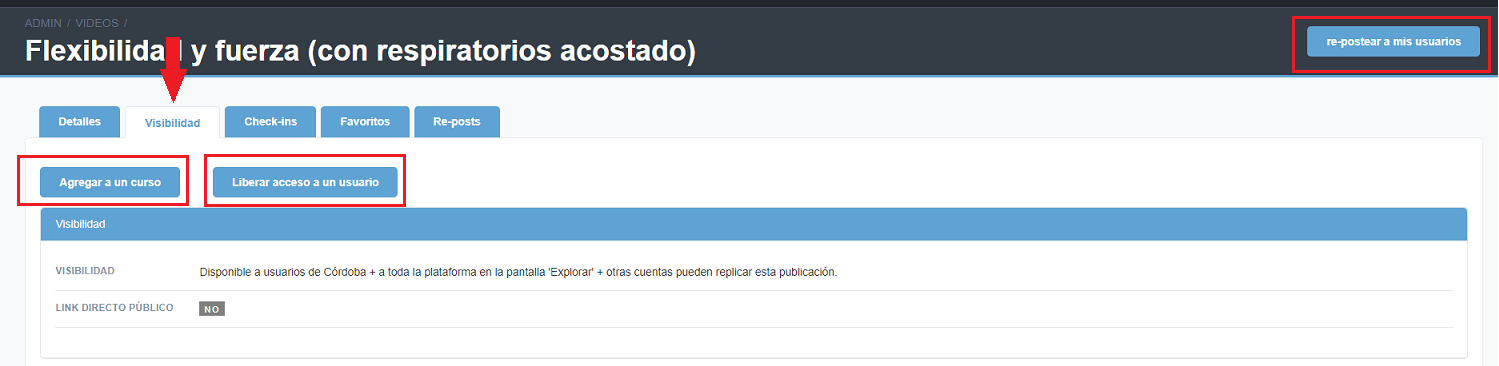
- Enter the publication that interests you and click on the button 're-post to my users'
- Click on 'Save Re-post'
With some users or add to a course
- Enter from the menu 'Publications' to videos, LIVEs, audios, etc
- Click on 'To share', above the publication table
- You will see the publications that other schools have made available to share with others
- Enter the publication that interests you and in the “Visibility” tab you will be able to add the publication to a course or release access to a user
Automatically
With the tool of re-posts automatic or mass it is very easy
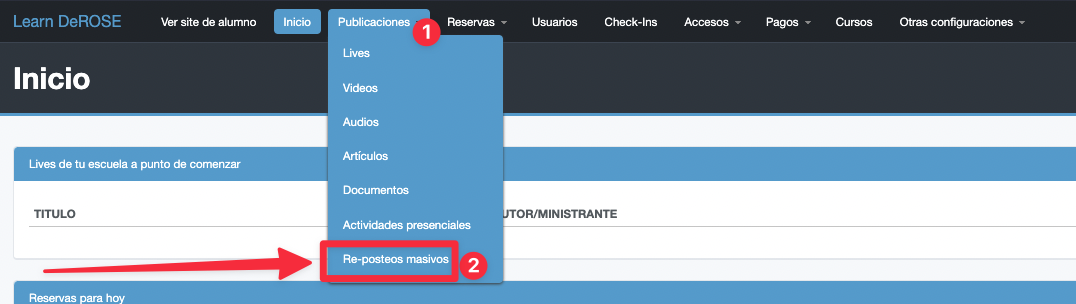
Choose the filters you want to apply, for example to always share the classes of a specific school, teacher, etc., and each time those criteria are met, the content will appear directly for your users 😉
Ex: Articles
Share activities with a specific school
You can do this by going to the publication → visibility → available to be replicated by selected schools.
For students to see your publications, it is necessary that these selected schools make the repost 😉