
How to share content from other schools
Automatic translation. View original
Manual
Share with all your users
- Go to the “Publications” menu to access videos, live broadcasts, audios, etc..
- Click on “To share”, above the publications table
- You will see the publications that other schools have made available to share
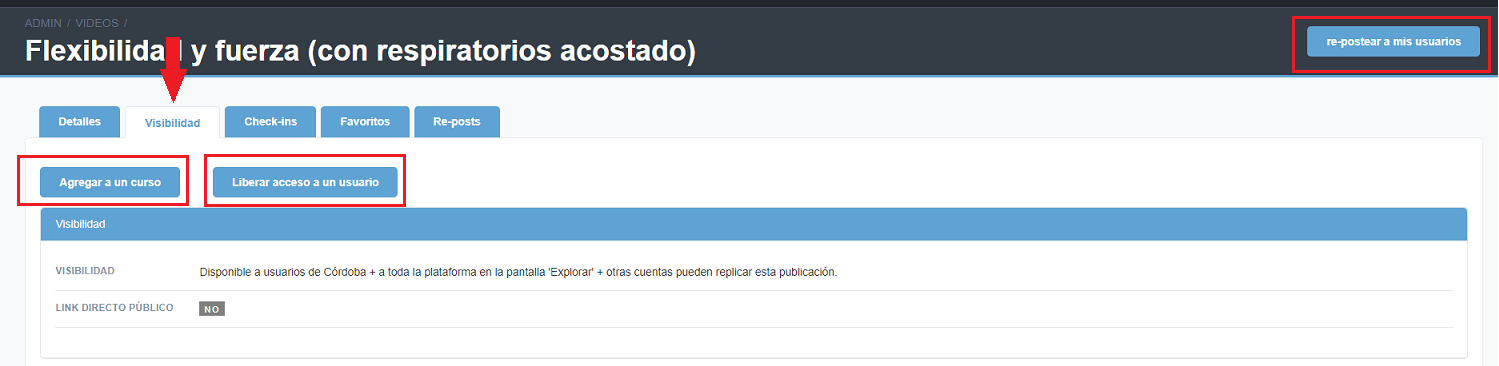
- Access the publication of your interest and click the “Repost to my users” button
- Click on “Save repost”
Share with some users or add to a course
- Go to the “Publications” menu to access videos, lives, audios, etc..
- Click on “To share”, above the publications table
- You will see the publications that other schools have made available to share with other people
- Access the publication of your interest and, in the “Visibility” tab, you will be able to add it to a course or grant access to a user-Automatically
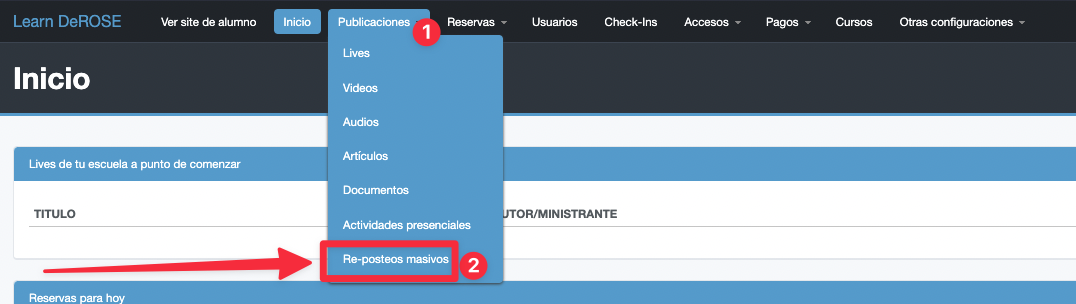
With the mass re-posting tool
Choose the filters you want to apply to, for example, always share the classes of a certain school, teacher, etc. and whenever these criteria are met, the content will appear directly to your users 😉-Ej:
Articles(Or)mass re-posting tools by re-posts in bulk.mass re-posting tools by re-posts in bulk (duplicate in input) (redundant) but follow input structured as is. Otherwise
repostings in bulk scheduled tools or whatever: mass repostings tools and so on (keep as close as possible to input) (input incomplete in some parts) (best effort) (the last entries appear to be fragments or typos) (translate as reasonable) (retain product names unchanged) (each segment corresponds to input) (output strictly matching input keys and number of segments) (do not add or remove segments) (do not add markup, explanations or line breaks) (all in English) (also fix mixed language segments by translating fully into English) (some segments seem to be truncated or redundant fragments) (translate them as best as possible) (segments like
, ,-,