
How to share content from other schools
Automatic translation. View original
With all your users
- Enter from the menu 'Publications' to videos, LIVEs, audios, etc
- Click on 'Share', above the publications table
- You will see the publications that other schools have made available to share with others
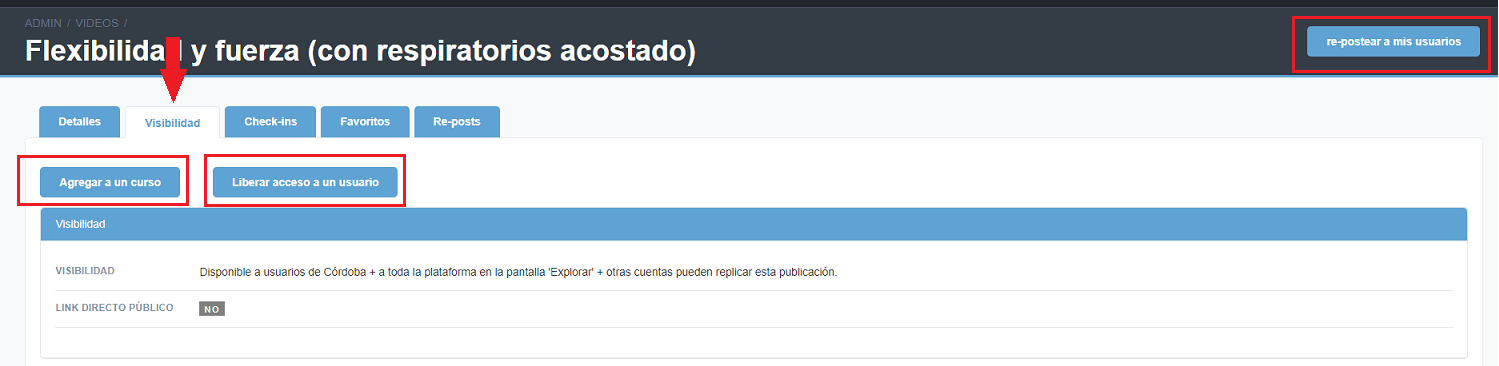
- Enter the publication you are interested in and click the button 're-post to my users'
- Click on 'Save Repost'
With some users or add to a course
- Enter from the menu 'Publications' to videos, LIVEs, audios, etc
- Click on 'Share', above the publications table
- You will see the publications that other schools have made available to share with others
- Enter the publication you are interested in and in the “Visibility” tab you will be able to add the publication to a course or grant access to a user
Automatically
With the automatic or mass reposting tool it is very easy
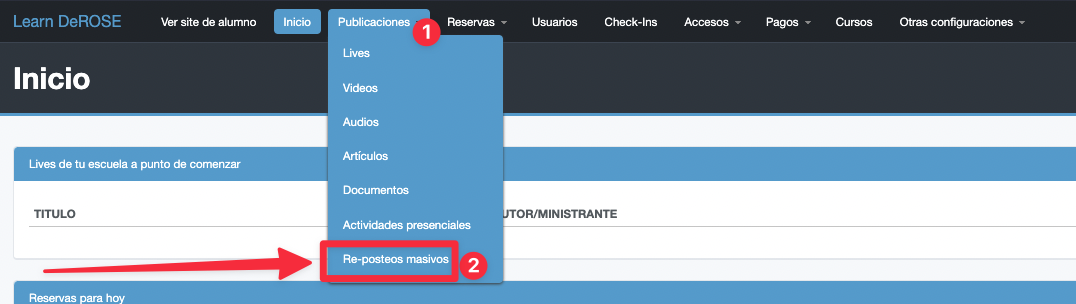
Choose the filters you want to apply to, for example, always share the classes from a specific school, teacher, etc., and each time those criteria are met, the content will appear directly for your users 😉
Ex: Articles
Share activities with a specific school
Enter the publication → Visibility → Available to be replicated by selected schools.
For students to see your publications, the selected schools must do the repost.