<a id="f0fcead93d124ed7821197bc4f8e45f2"></a><a id="f0fcead9-3d12-4ed7-8211-97bc4f8e45f2"></a>

<a id="c626ca18ef24439583b53aec0c2cbc99"></a><a id="c626ca18-ef24-4395-83b5-3aec0c2cbc99"></a>

We <a href="https://app.notion.com/p/368a67c8f14440af95366be3d4814574?pvs=204">Recommend Vimeo</a> for you to save your content and publish on Learn.

<a id="285220f1cd374120a32d6f533deda7a5"></a><a id="285220f1-cd37-4120-a32d-6f533deda7a5"></a>

<a id="5a69fc44a9394894baa7d1f9b325f008"></a><a id="5a69fc44-a939-4894-baa7-d1f9b325f008"></a>

## <a id="configurar-visibilidade-de-um-video" data-help-heading="true"></a>Configure video visibility

<a id="0a4519ab147b46b69f66c01e9e4ca446"></a><a id="0a4519ab-147b-46b6-9f66-c01e9e4ca446"></a>

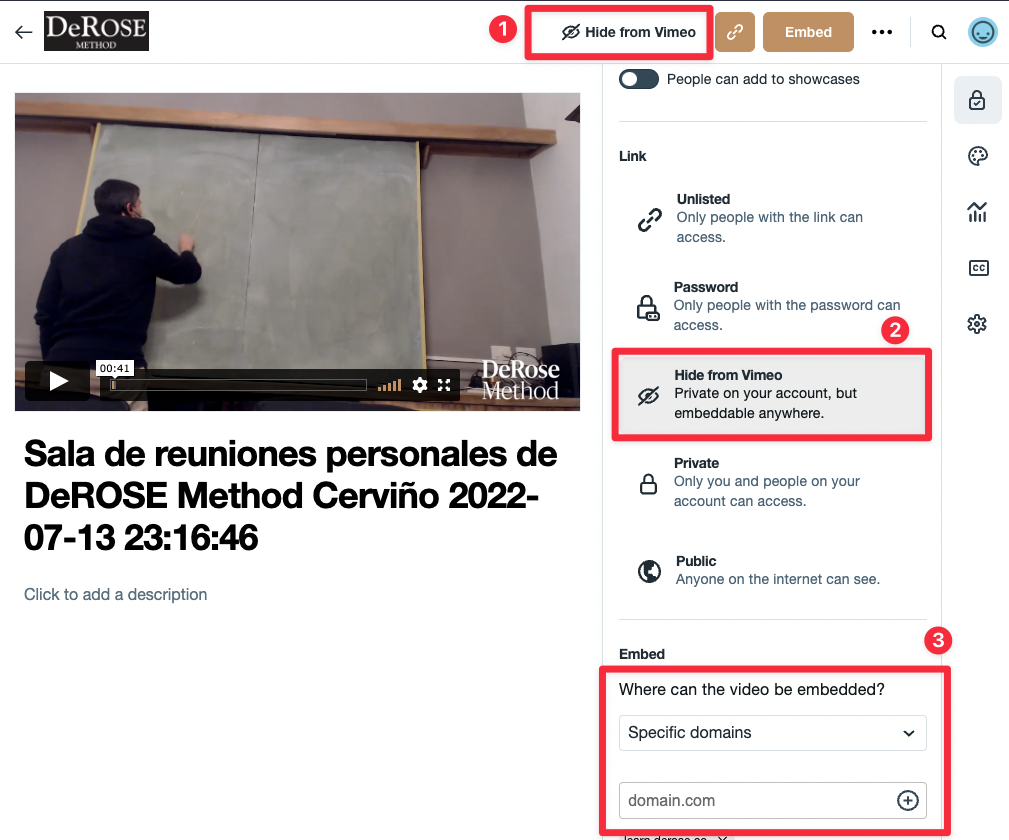
To ensure the security of your content, we recommend choosing this setting in your video visibility: “<strong>Hide from Vimeo</strong>” (see 1 and 2 in the image)

<a id="e62c723d74124bae9d31591034327066"></a><a id="e62c723d-7412-4bae-9d31-591034327066"></a>

And add the domain <a href="http://learn.derose.app"><strong>learn.derose.app</strong></a> in the domains where videos can be placed. (see 3 in the image)
<a id="dfa20a4aded64b67805dc7b5db26f4a0"></a><a id="dfa20a4a-ded6-4b67-805d-c7b5db26f4a0"></a>

<img src="/help-assets/1d13ceb800159a93e148a105eece6cc4c8075cdcb0cd16ca94e49cfdac293748.png" alt="CleanShot 2022-07-15 at 11.47.35.png">

<a id="589eb93242264b16983d92a97253313a"></a><a id="589eb932-4226-4b16-983d-92a97253313a"></a>

<a id="4dd0b325b585405f89f9e384a15c80a7"></a><a id="4dd0b325-b585-405f-89f9-e384a15c80a7"></a>

## <a id="aplicar-a-todos-os-videos" data-help-heading="true"></a>Apply to all videos

<a id="912d246e3575496697883e6921e51885"></a><a id="912d246e-3575-4966-9788-3e6921e51885"></a>

If you want to apply this setting automatically to all videos

<a id="8fb44360474c448ab5dc4c9efe10f36a"></a><a id="8fb44360-474c-448a-b5dc-4c9efe10f36a"></a>

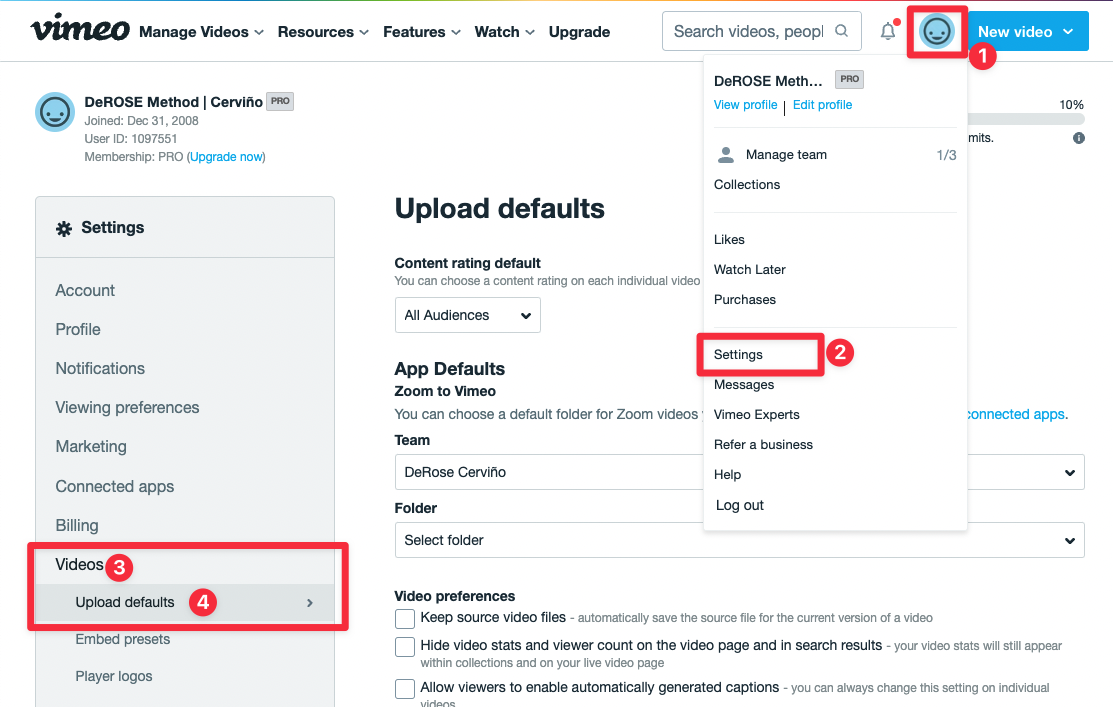
For this, go to the “Upload defaults” setting:
<a id="0686a230d6be42c8b3babb0f5afadcc8"></a><a id="0686a230-d6be-42c8-b3ba-bb0f5afadcc8"></a>

<img src="/help-assets/3d6cff3206daa925d21a38071259c54b3620142ab46f8caf103f44d92c999deb.png" alt="CleanShot 2022-07-15 at 12.05.17.png">

<a id="3574b0710fe24ad4812ab1c111f160ec"></a><a id="3574b071-0fe2-4ad4-812a-b1c111f160ec"></a>

<a id="c94cac1f0ace42fdab62cf535707dbc5"></a><a id="c94cac1f-0ace-42fd-ab62-cf535707dbc5"></a>

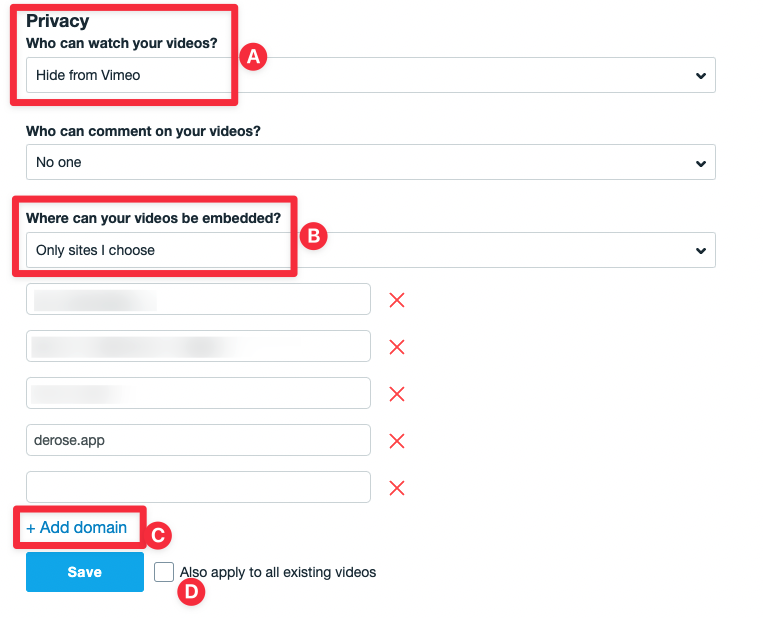
And in the “Privacy” section select “Hide from Vimeo” in (A), “Only sites I choose” in (B) and in (C) add the domain <strong>learn.derose.app. </strong>

<a id="0841daa2e19a4f0d872d4d05def3957e"></a><a id="0841daa2-e19a-4f0d-872d-4d05def3957e"></a>

If you want to apply the change to all previous videos enable the option “Also apply to all existing videos” (D).
<a id="53484825eb48403e9ca4a0cf19775315"></a><a id="53484825-eb48-403e-9ca4-a0cf19775315"></a>

<img src="/help-assets/a9d18b7e0864e53e793a87d3b1f2ffbf8f2226577335fadb43cb3adf887bf54b.png" alt="CleanShot 2022-07-16 at 17.46.05.png">

<a id="d3ff9f9483e64f728599f7f4b351bd61"></a><a id="d3ff9f94-83e6-4f72-8599-f7f4b351bd61"></a>
