<a id="f43723b346e047788627d6601118c018"></a><a id="f43723b3-46e0-4778-8627-d6601118c018"></a>

<a id="ef7c838e9d924accba84d761053a81df"></a><a id="ef7c838e-9d92-4acc-ba84-d761053a81df"></a>

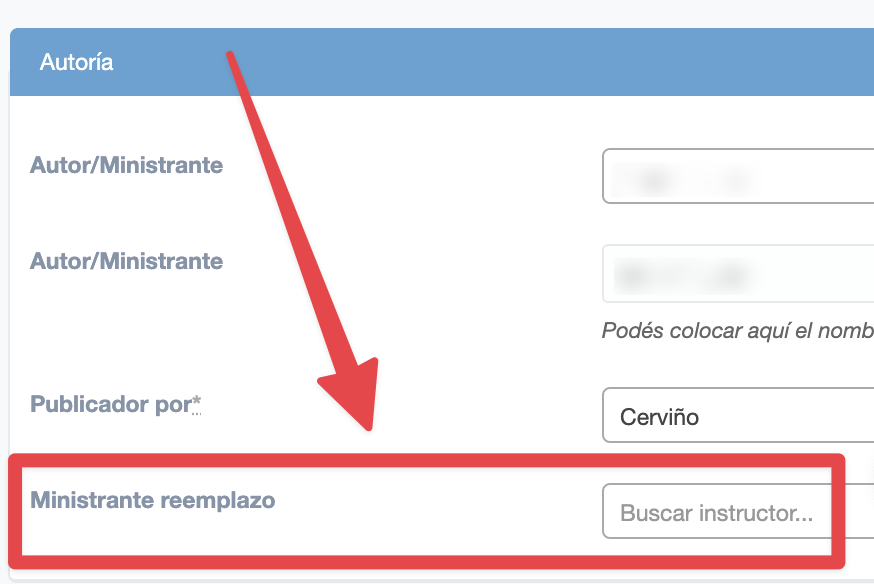
In live and in-person classes you can set up a substitute instructor.

<a id="33c3160bddf28011beeefd1d2db71614"></a><a id="33c3160b-ddf2-8011-beee-fd1d2db71614"></a>

The configuration does not have a specific date. The substitute instructor will appear on screens while configured.

<a id="33c3160bddf280968b56dcc04c3bd6be"></a><a id="33c3160b-ddf2-8096-8b56-dcc04c3bd6be"></a>

The check-ins in this class will be recorded with whoever gave the class (the regular instructor or a substitute). Thus, in the check-ins the history is kept for reports and control. 

<a id="a2cb6b22ea9243cd8b7dc7ee0b5775e9"></a><a id="a2cb6b22-ea92-43cd-8b7d-c7ee0b5775e9"></a>

# <a id="como-configurar-o-instrutor-substituto-na-aula" data-help-heading="true"></a>How to set up the substitute instructor in the class

<a id="33c3160bddf280839932e0f9e327ad4c"></a><a id="33c3160b-ddf2-8083-9932-e0f9e327ad4c"></a>

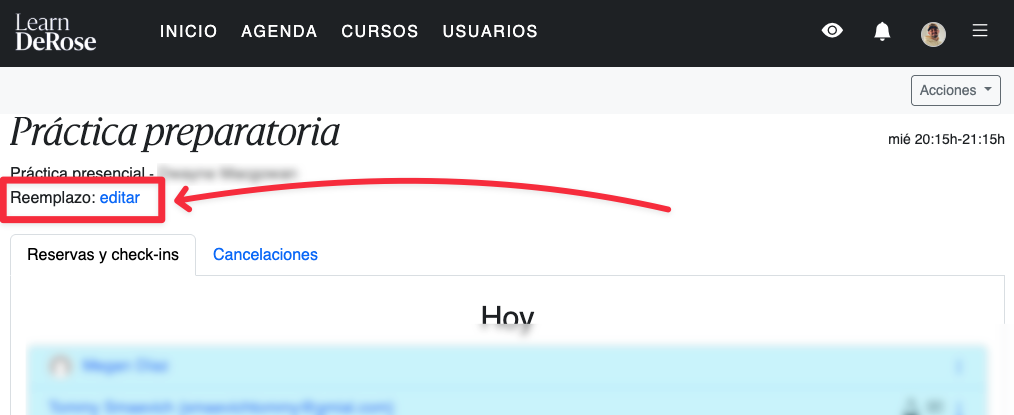
You can change it in the instructor app:
<a id="33c3160bddf280828947d437fe442681"></a><a id="33c3160b-ddf2-8082-8947-d437fe442681"></a>

<img src="/help-assets/d6705e4a7a120930c21e8df18e7f1be00fe617139aa055da97b023c238078f37.png" alt="CleanShot 2026-04-08 at 16.54.58.png">

<a id="172df3f5e8ed44efb950793291b4e236"></a><a id="172df3f5-e8ed-44ef-b950-793291b4e236"></a>

Or in the advanced panel:

<a id="03e413999cbd4f9fac90506d32579ecf"></a><a id="03e41399-9cbd-4f9f-ac90-506d32579ecf"></a>

<img src="/help-assets/86252060fa4aa79757069c64b78baefe571c5a71cbaa49200c70480b4d3c60e0.png" alt="CleanShot 2023-02-16 at 17.09.36@2x.png">

<a id="1b0961eb204a4184b13a5db22cf2c848"></a><a id="1b0961eb-204a-4184-b13a-5db22cf2c848"></a>

<a id="57c46f745d574fb381af57a8ddf1cdf0"></a><a id="57c46f74-5d57-4fb3-81af-57a8ddf1cdf0"></a>

# <a id="como-funciona-o-instrutor-substituto" data-help-heading="true"></a>How the substitute instructor works

<a id="67144d0dfee741eca460c0514bbf4b2d"></a><a id="67144d0d-fee7-41ec-a460-c0514bbf4b2d"></a>

As long as the class has a substitute instructor configured:

- <a id="208835b84c9549eebf3242514026ac8d"></a><a id="208835b8-4c95-49ee-bf32-42514026ac8d"></a>the checkins in that class will be linked to that other instructor
- <a id="acd49bab9a5640f1a1eb3231c81892c4"></a><a id="acd49bab-9a56-40f1-a1eb-3231c81892c4"></a>that other instructor will be able to view the class reservations

    - <a id="6c53b0adf74f4281ba99d32d1a5e086a"></a><a id="6c53b0ad-f74f-4281-ba99-d32d1a5e086a"></a><em>not on the dashboard but on the reservations screen. </em>
- <a id="4f824dd96d3243daa5c5e4d0d1015f78"></a><a id="4f824dd9-6d32-43da-a5c5-e4d0d1015f78"></a>that other instructor will receive notifications of reservations and their cancellations
- <a id="fc8ce5c976fa44bf82c4cb9efa4eddd4"></a><a id="fc8ce5c9-76fa-44bf-82c4-cb9efa4eddd4"></a>students will see the name of the substitute instructor this way:

    <a id="65ba3d47c7d845d1bc1b57bc7f1940a0"></a><a id="65ba3d47-c7d8-45d1-bc1b-57bc7f1940a0"></a>
    
    <img src="/help-assets/6a94aad60fb8042e9264590e41ef8075eeb413322bba2a2275470441382e95f3.png" alt="CleanShot 2023-02-16 at 17.12.37@2x.png">

<a id="937346009f6e4e6e860124add5cef10c"></a><a id="93734600-9f6e-4e6e-8601-24add5cef10c"></a>

<a id="35d5960208ed4499baec8cfb43f8a258"></a><a id="35d59602-08ed-4499-baec-8cfb43f8a258"></a>

# <a id="como-tirar-o-instrutor-substituto" data-help-heading="true"></a>How to remove the substitute instructor

<a id="0e59bbd0cf65497d814fa17d66f91c89"></a><a id="0e59bbd0-cf65-497d-814f-a17d66f91c89"></a>

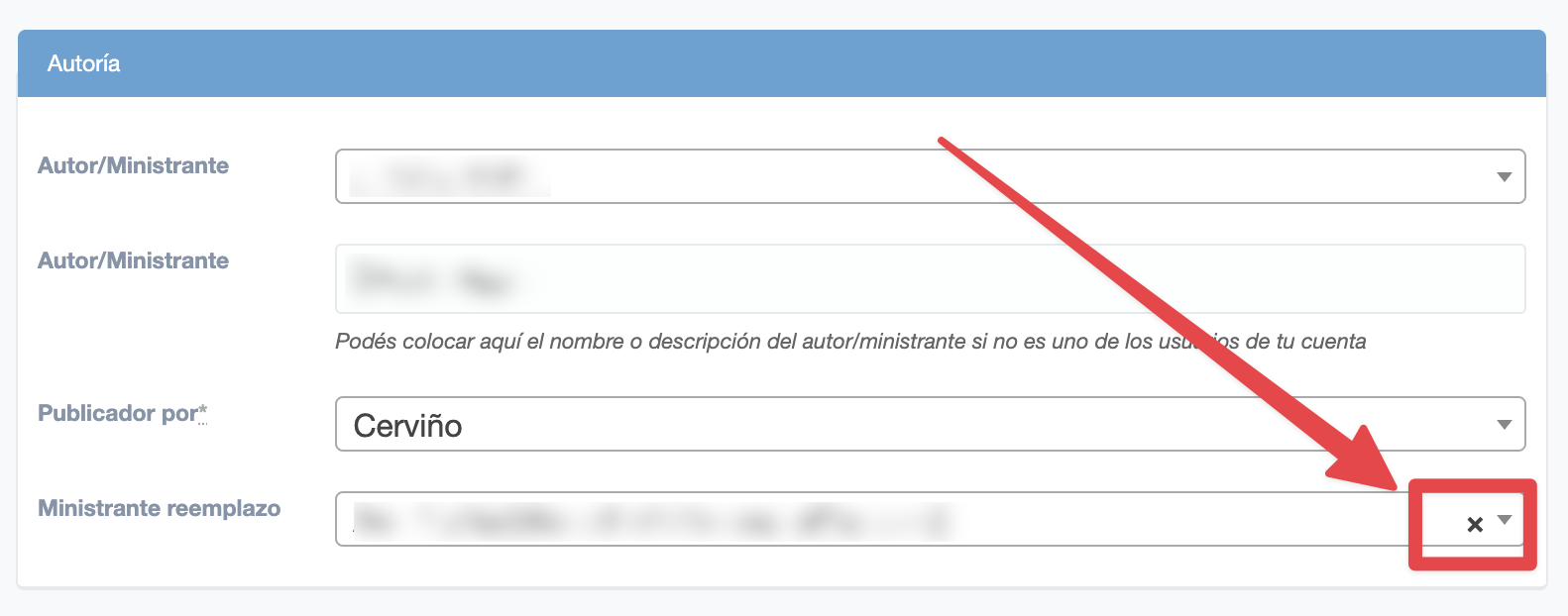
In the post editing, click on the cross and then save the changes
<a id="255d5a66ddcc46f58500a20f93a52bf1"></a><a id="255d5a66-ddcc-46f5-8500-a20f93a52bf1"></a>

<img src="/help-assets/49abdd2a0ef38481720fd5ffccedc27ffef075ce041fbe647d38617c6436bbab.png" alt="CleanShot 2023-02-16 at 17.14.09@2x.png">

<a id="33c3160bddf2800aa062d74e02f5639e"></a><a id="33c3160b-ddf2-800a-a062-d74e02f5639e"></a>

<a id="5b96471269dd4df19018c91cd0e37c79"></a><a id="5b964712-69dd-4df1-9018-c91cd0e37c79"></a>

# <a id="cadastrar-substituição-em-aulas-passadas" data-help-heading="true"></a>Register substitution in past classes

<a id="33c3160bddf2805f9ac3fffecf2b6644"></a><a id="33c3160b-ddf2-805f-9ac3-fffecf2b6644"></a>

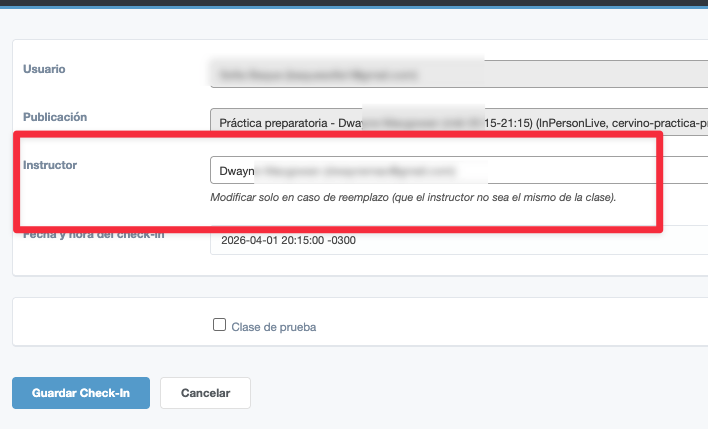
To register substitution in past classes you record directly in the check-ins, in the advanced panel:

<a id="33c3160bddf28026bfb3d51e26a7d804"></a><a id="33c3160b-ddf2-8026-bfb3-d51e26a7d804"></a>

In the check-in click on “change” and modify the instructor field.
<a id="33c3160bddf280de93dae56573a84b3f"></a><a id="33c3160b-ddf2-80de-93da-e56573a84b3f"></a>

<img src="/help-assets/d0a5a594be506485a4697117f526883c2304e0f2687a00ef050942030274a26f.png" alt="CleanShot 2026-04-08 at 16.58.45.png">

<a id="33c3160bddf280609ce6e87c3d17d497"></a><a id="33c3160b-ddf2-8060-9ce6-e87c3d17d497"></a>

<a id="33c3160bddf2805788a8e5f1002abcd6"></a><a id="33c3160b-ddf2-8057-88a8-e5f1002abcd6"></a>