<a id="12e3160bddf2804886a5e327f8589918"></a><a id="12e3160b-ddf2-8048-86a5-e327f8589918"></a>

<a id="12e3160bddf280bc97afcf4730b00f61"></a><a id="12e3160b-ddf2-80bc-97af-cf4730b00f61"></a>

- <a href="#12e3160bddf280e594e4c7672d5e7409">How to obtain printed GiftCards</a>
- <a href="#12e3160bddf280df9a96e89982314eb8">Manage my GiftCards</a>
  - <a href="#12e3160bddf2808aaface7576c8d63b8">Edit the content of the GiftCard</a>
  - <a href="#12e3160bddf280438471f8c389363f33">Mark a GiftCard as delivered</a>
  - <a href="#12e3160bddf2805791a0cf4fb9d7cc9e">Mark a GiftCard as redeemed</a>
- <a href="#12e3160bddf2807c85a8d1a63e084a15">How the student/prospect redeems their GiftCard</a>

<a id="12e3160bddf280e594e4c7672d5e7409"></a><a id="12e3160b-ddf2-80e5-94e4-c7672d5e7409"></a>

# <a id="cómo-obtener-las-giftcards-impresas" data-help-heading="true"></a>How to obtain printed GiftCards

<a id="12e3160bddf280b1a8cfc9ebc97a1a6b"></a><a id="12e3160b-ddf2-80b1-a8cf-c9ebc97a1a6b"></a>

The printed GiftCards are sold by the DeROSE Cerviño school: <a href="https://www.derosecervino.com.ar/whatsapp-direct">whatsapp</a>

<a id="12e3160bddf280df9a96e89982314eb8"></a><a id="12e3160b-ddf2-80df-9a96-e89982314eb8"></a>

# <a id="administrar-mis-giftcards" data-help-heading="true"></a>Manage my GiftCards

<a id="12e3160bddf2800aab71dbf2f6c54b15"></a><a id="12e3160b-ddf2-800a-ab71-dbf2f6c54b15"></a>

By entering the advanced Learn panel, in “<a href="https://learn.derose.app/admin/gifts_gifts">Other settings > Gifts Gifts</a>”

<a id="12e3160bddf2803285a5c551adbdb89b"></a><a id="12e3160b-ddf2-8032-85a5-c551adbdb89b"></a>

<img src="/help-assets/dba997598151002ad1acee933f94f8b536786dad9b3f98a05bebcaae8e4036a2.png" alt="CleanShot 2024-10-29 at 13.12.49.png">

<a id="12e3160bddf280309ffee967f7b07c8f"></a><a id="12e3160b-ddf2-8030-9ffe-e967f7b07c8f"></a>

<a id="12e3160bddf28017968af7cf222a96d5"></a><a id="12e3160b-ddf2-8017-968a-f7cf222a96d5"></a>

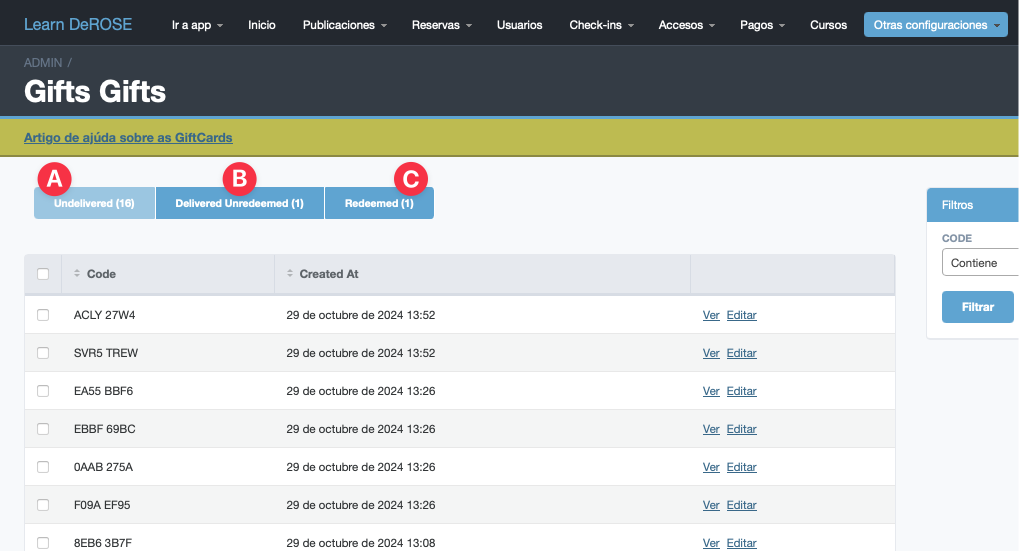
A) GiftCards that have not yet been delivered. They will not be available in the redemption system.

<a id="12e3160bddf280f7b991c88a7faad79f"></a><a id="12e3160b-ddf2-80f7-b991-c88a7faad79f"></a>

B) GiftCards that have already been delivered and are enabled and available in the redemption system.

<a id="12e3160bddf2808a9696f237b5b6e519"></a><a id="12e3160b-ddf2-808a-9696-f237b5b6e519"></a>

C) GiftCards that have already been redeemed for their respective benefit.

<a id="12e3160bddf28061b3f4d4935e62a03d"></a><a id="12e3160b-ddf2-8061-b3f4-d4935e62a03d"></a>

<a id="12e3160bddf2808aaface7576c8d63b8"></a><a id="12e3160b-ddf2-808a-afac-e7576c8d63b8"></a>

## <a id="editar-el-contenido-de-la-giftcard" data-help-heading="true"></a>Edit the content of the GiftCard

<a id="12e3160bddf2803499ccc25e572e6b90"></a><a id="12e3160b-ddf2-8034-99cc-c25e572e6b90"></a>

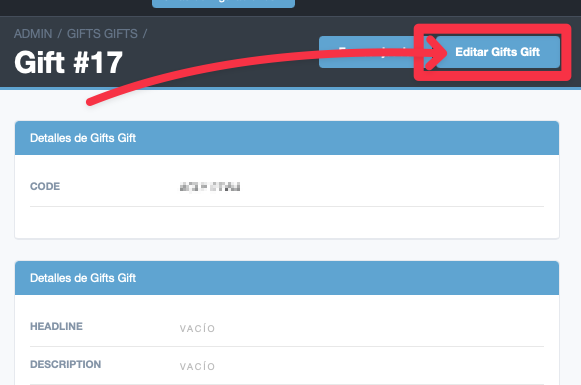
By entering the detail of a GiftCard you have the button to edit its content.
<a id="12e3160bddf28020b786cb0110631bd3"></a><a id="12e3160b-ddf2-8020-b786-cb0110631bd3"></a>

<img src="/help-assets/33df811589c929309af6ef750a6814d21ee8aeb5177caddc2767bfd8e7ae95a2.png" alt="CleanShot 2024-10-29 at 13.24.25.png">

<a id="15a3160bddf28075b8d1f34b196a7dbf"></a><a id="15a3160b-ddf2-8075-b8d1-f34b196a7dbf"></a>

You will access a form to set:

- <a id="15a3160bddf2805782f5fd95a2474a6b"></a><a id="15a3160b-ddf2-8057-82f5-fd95a2474a6b"></a>TITLE
- <a id="15a3160bddf280249a3be1fcfe855e99"></a><a id="15a3160b-ddf2-8024-9a3b-e1fcfe855e99"></a>DESCRIPTION

<a id="15a3160bddf2807a818ce85f54a66cdf"></a><a id="15a3160b-ddf2-807a-818c-e85f54a66cdf"></a>

Whoever redeems the GiftCard will arrive at a landing page with that content.

<a id="12e3160bddf280438471f8c389363f33"></a><a id="12e3160b-ddf2-8043-8471-f8c389363f33"></a>

## <a id="marcar-un-giftcard-como-entregada" data-help-heading="true"></a>Mark a GiftCard as delivered

<a id="12e3160bddf2801c8628d2ffe10a4b6a"></a><a id="12e3160b-ddf2-801c-8628-d2ffe10a4b6a"></a>

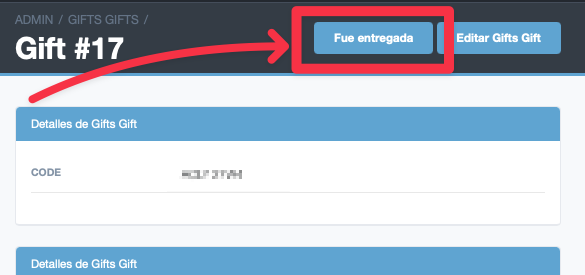
By entering the detail of a GiftCard you have the button to mark it as delivered. This enables the code so it can be redeemed in the redemption system.
<a id="12e3160bddf280f0bfcdf9415127f94c"></a><a id="12e3160b-ddf2-80f0-bfcd-f9415127f94c"></a>

<img src="/help-assets/15b3c66d8a9b17f7376f42d004c3a7399d4fdd2abcbaf00376bcc5c29b784d3c.png" alt="CleanShot 2024-10-29 at 13.18.48.png">

<a id="12e3160bddf280efbc24f4a1b235b063"></a><a id="12e3160b-ddf2-80ef-bc24-f4a1b235b063"></a>

<a id="12e3160bddf2805791a0cf4fb9d7cc9e"></a><a id="12e3160b-ddf2-8057-91a0-cf4fb9d7cc9e"></a>

## <a id="marcar-una-giftcard-como-canjeada" data-help-heading="true"></a>Mark a GiftCard as redeemed

<a id="12e3160bddf28089ab5fc6d6163f9fef"></a><a id="12e3160b-ddf2-8089-ab5f-c6d6163f9fef"></a>

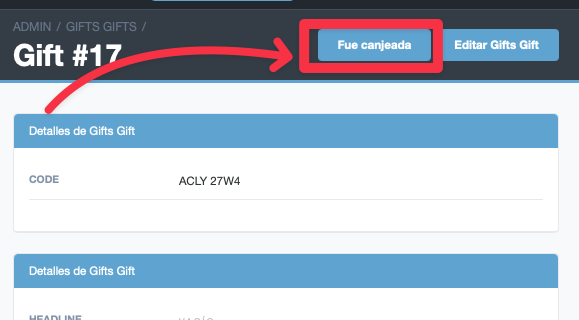
By entering the detail of a GiftCard, if it has already been delivered, you have the button to mark it as redeemed.
<a id="12e3160bddf2808db7dbd7e9a1219294"></a><a id="12e3160b-ddf2-808d-b7db-d7e9a1219294"></a>

<img src="/help-assets/6c4c331c353256ca1d9f614cfc2282bd0cce909a0687b516d034b9640686e3c9.png" alt="CleanShot 2024-10-29 at 13.20.40.png">

<a id="15a3160bddf2800db211c7a7b65661db"></a><a id="15a3160b-ddf2-800d-b211-c7a7b65661db"></a>

<a id="12e3160bddf280d4b417d4620a6d7689"></a><a id="12e3160b-ddf2-80d4-b417-d4620a6d7689"></a>

Once this is done the code will no longer be available to be redeemed.

<a id="12e3160bddf2807c85a8d1a63e084a15"></a><a id="12e3160b-ddf2-807c-85a8-d1a63e084a15"></a>

# <a id="cómo-canjea-su-giftcard-el-alumnoprospect" data-help-heading="true"></a>How the student/prospect redeems their GiftCard

<a id="12e3160bddf280209d30e620c1904539"></a><a id="12e3160b-ddf2-8020-9d30-e620c1904539"></a>

The student must scan the QR on the GiftCard or enter <a href="https://gift.derose.app/redeem">gift.derose.app</a>

<a id="12e3160bddf280188264e8c79d3c405b"></a><a id="12e3160b-ddf2-8018-8264-e8c79d3c405b"></a>

There you have a field to enter your GiftCard code.

<a id="15a3160bddf280079947d480f68f89a1"></a><a id="15a3160b-ddf2-8007-9947-d480f68f89a1"></a>

Upon entering the code the user will reach a screen with the information the school configured. (see “Edit the content of the GiftCard” above)

<a id="12e3160bddf28086af89e2b6fc3aca28"></a><a id="12e3160b-ddf2-8086-af89-e2b6fc3aca28"></a>

> <a id="12e3160bddf2806a80b1c59933af7716"></a><a id="12e3160b-ddf2-806a-80b1-c59933af7716"></a>
> 
> If the GiftCard was not marked as “delivered” it will not be available in the redemption system.