<a id="e0175e32433149d88ba6aa8e475a581a"></a><a id="e0175e32-4331-49d8-8ba6-aa8e475a581a"></a>

<a id="0f242dae3d7b4959b85763dfe805f90a"></a><a id="0f242dae-3d7b-4959-b857-63dfe805f90a"></a>

The check-in is similar to the old attendance in PADMA. A check-in represents that someone participated in a class, or watched a video, read an article, practiced with a timer, etc..

<a id="e55251e348234001b7a605504cfa9456"></a><a id="e55251e3-4823-4001-b7a6-05504cfa9456"></a>

With the Learn platform you no longer need to register attendances manually 😀

<a id="f15b5e54441f43a1bcc338dfd924c95d"></a><a id="f15b5e54-441f-43a1-bcc3-38dfd924c95d"></a>

# <a id="check-ins-automáticos" data-help-heading="true"></a>Automatic check ins

<a id="4994a31a437b4d52b368dee86ce1f065"></a><a id="4994a31a-437b-4d52-b368-dee86ce1f065"></a>

<strong>In LIVE broadcasts</strong> a check in is generated automatically when the user accesses the stream.

<a id="9b89ddc0cfca4a198453cdc1e0616bbe"></a><a id="9b89ddc0-cfca-4a19-8453-cdc1e0616bbe"></a>

<strong>In in-person classes</strong> a check-in is generated automatically at the class time for users who have a reservation in that class. (see <a href="https://app.notion.com/p/7455a9f7d6c0469088f43ec558b8441f?pvs=204">Bookings - Reservations</a>)

<a id="636bbe7e818149e2888ed7ddc5dcd6d8"></a><a id="636bbe7e-8181-49e2-888e-d7ddc5dcd6d8"></a>

In<strong> on-demand videos using Vimeo or YouTube</strong> the check in is generated automatically when the user watches 80% of the video.

<a id="007b33b03d5c4514a74e2816ce98841d"></a><a id="007b33b0-3d5c-4514-a74e-2816ce98841d"></a>

In <strong>articles</strong> the check-in is generated automatically when the estimated reading time passes with the article open.

<a id="6d50b0f3281a4f0f8dcd63286b56dae2"></a><a id="6d50b0f3-281a-4f0f-8dcd-63286b56dae2"></a>

In <strong>published timers</strong> the check-in is generated automatically when the timer finishes.

<a id="9b18962960eb4ca290de74d79d2efa8a"></a><a id="9b189629-60eb-4ca2-90de-74d79d2efa8a"></a>

# <a id="check-in-manual" data-help-heading="true"></a>Manual check in

<a id="1893160bddf2811c898bd823054caa64"></a><a id="1893160b-ddf2-811c-898b-d823054caa64"></a>

> <a id="1893160bddf281aab223f9f315166236"></a><a id="1893160b-ddf2-81aa-b223-f9f315166236"></a>
> 
> This tool is exclusive to Learn PREMIUM. Not available in the free version.

<a id="9ea6ce2dcc504d28921a6a0bde81fa3d"></a><a id="9ea6ce2d-cc50-4d28-921a-6a0bde81fa3d"></a>

You can manually register check-ins from the <a href="https://app.notion.com/p/cc937137d7044d738d33fba9ac3a5cc2?pvs=204">Instructor app</a>.

<a id="c592335f23c54ccdbe8fdaa00d788d7c"></a><a id="c592335f-23c5-4ccd-be8f-daa00d788d7c"></a>

<a href="/help-assets/d95da4f9576b73e147afe1ead12c19a74f0ca49dae6ba3bc80e1ef3714b2b387.mp4">CleanShot 2023-05-12 at 15.06.29.mp4</a>

<a id="cbdb15308692435397fb5979f823585b"></a><a id="cbdb1530-8692-4353-97fb-5979f823585b"></a>

<a id="621aa77c3b9249f090027c1ee624abbc"></a><a id="621aa77c-3b92-49f0-9002-7c1ee624abbc"></a>

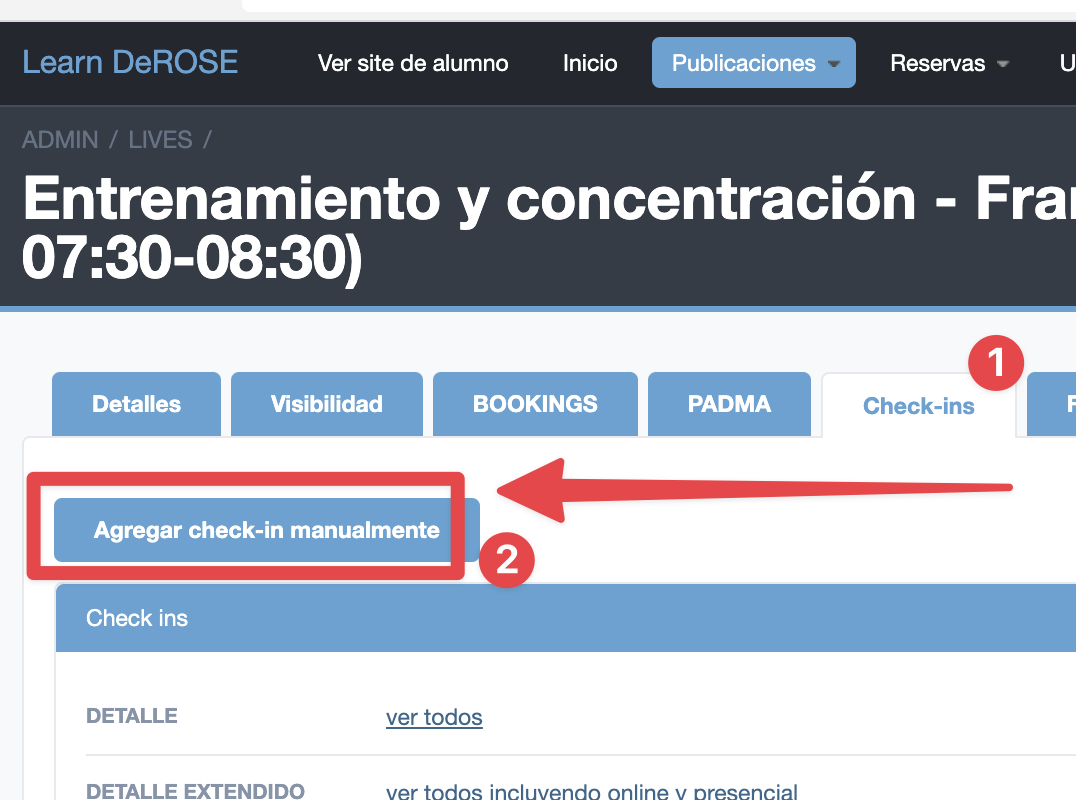
You can also manually register a check-ins in a Learn class in the advanced panel
<a id="549a05614982496083a8970ffbf56de1"></a><a id="549a0561-4982-4960-83a8-970ffbf56de1"></a>

<img src="/help-assets/26c2069d012a9be218aae86ee12b9af118a3bee2ff66140ee26cfd29e9b36291.png" alt="CleanShot 2022-11-17 at 16.07.13@2x.png">

<a id="3523160bddf2800c845ee03333b6f2dc"></a><a id="3523160b-ddf2-800c-845e-e03333b6f2dc"></a>

# <a id="última-vez-que-veio" data-help-heading="true"></a>Last time attended

<a id="3523160bddf2805ba6b5d8f59eae2e6a"></a><a id="3523160b-ddf2-805b-a6b5-d8f59eae2e6a"></a>

The check-in in Live or In-person class automatically updates the “last time attended” field in CRM/PADMA.

<a id="3523160bddf2802ca002d7b0bb71c75b"></a><a id="3523160b-ddf2-802c-a002-d7b0bb71c75b"></a>

In Learn you can enable the option for check-ins in videos to also update this field.

<a id="efb95b9badec4802aa2402820e233c39"></a><a id="efb95b9b-adec-4802-aa24-02820e233c39"></a>

# <a id="reportes-de-participação" data-help-heading="true"></a>Participation reports

<a id="1893160bddf281bcb1fbfd733abc92a4"></a><a id="1893160b-ddf2-81bc-b1fb-fd733abc92a4"></a>

> <a id="1893160bddf281c69302c61290c904e0"></a><a id="1893160b-ddf2-81c6-9302-c61290c904e0"></a>
> 
> This tool is exclusive to Learn PREMIUM. Not available in the free version.

<a id="71ab45bc457348ad83c3938d2a2955e4"></a><a id="71ab45bc-4573-48ad-83c3-938d2a2955e4"></a>

From the check ins we have already registered in PADMA the student's last class date and there is also a report in Learn of distribution by instructor for your Participatory Administration closures.

<a id="7a489a3e9d784a7c914ae9266cf9db37"></a><a id="7a489a3e-9d78-4a7c-914a-e9266cf9db37"></a>

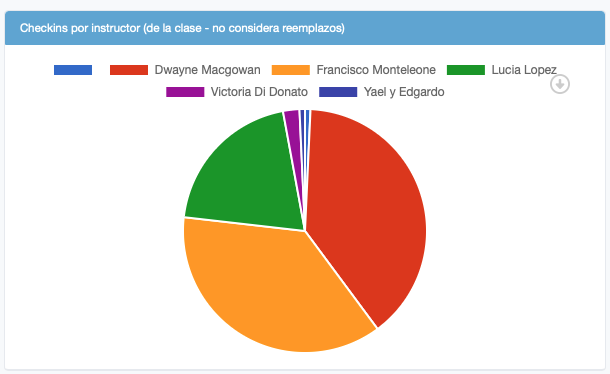
There is a report of check ins distribution by instructor
<a id="bcd3c69598f94f349738f9d102cb2814"></a><a id="bcd3c695-98f9-4f34-9738-f9d102cb2814"></a>

<img src="/help-assets/75a779cc44d9ab5d01fac90633207f2df1ed043a8f2ba9444d5381af570a158f.png" alt="CleanShot 2024-05-21 at 10.35.01.png">

<a id="381ddbde1c7f410ca3e8223232048a17"></a><a id="381ddbde-1c7f-410c-a3e8-223232048a17"></a>

<a id="a21bb87f8e8e45a59d49196e6680ee96"></a><a id="a21bb87f-8e8e-45a5-9d49-196e6680ee96"></a>

<a id="a4286886b1f24038a088edc158f2759f"></a><a id="a4286886-b1f2-4038-a088-edc158f2759f"></a>

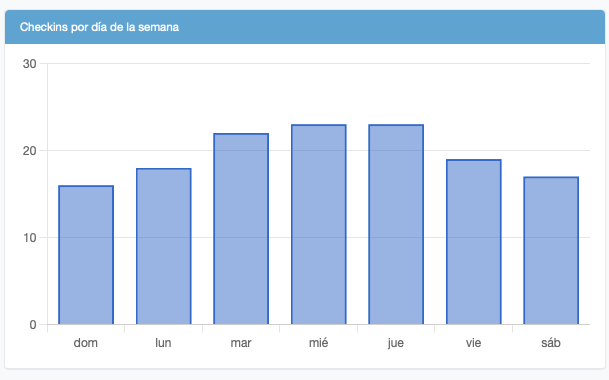
You can evaluate which days of the week have more check ins
<a id="d9e8dc24dbe84e72afeb1cb5bcc0e8f5"></a><a id="d9e8dc24-dbe8-4e72-afeb-1cb5bcc0e8f5"></a>

<img src="/help-assets/04af9bdf8b7148fbaa53f2f786d8d950500ed1fa220b704df0810661b143cce1.png" alt="CleanShot 2024-05-21 at 10.35.41.png">

<a id="62b2ae5bb7a046898bef5107fe005007"></a><a id="62b2ae5b-b7a0-4689-8bef-5107fe005007"></a>

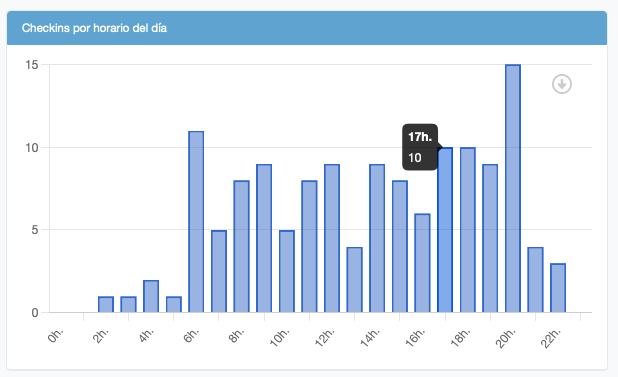
Or at what times have more check ins

<a id="60aeb5b46832411bb9ef3cc2fc304807"></a><a id="60aeb5b4-6832-411b-b9ef-3cc2fc304807"></a>

<img src="/help-assets/0f5dd2951ef4843fd6bfd3bb623138f20d5a5154f19e2ccde0bc1a4931437ff4.png" alt="CleanShot 2024-05-21 at 10.36.02.png">

<a id="ffb15631755d498f8de5d438b34589b2"></a><a id="ffb15631-755d-498f-8de5-d438b34589b2"></a>

<a id="2988169c51c6447e98451bc565098641"></a><a id="2988169c-51c6-447e-9845-1bc565098641"></a>

### <a id="relatório-de-check-in-e-reservas" data-help-heading="true"></a>Check in and reservations report-report:

<a id="ed36f3214c6b40d582d690775ea019bf"></a><a id="ed36f321-4c6b-40d5-82d6-90775ea019bf"></a>

<a id="3533255fd08c408f8fe4c7547211ab10"></a><a id="3533255f-d08c-408f-8fe4-c7547211ab10"></a>

<a href="/help-assets/9069a73d49e620eee50947aa1bf7981e78cd7fb6674992e9fa157b853efeb53b.mp4">mp4.Class substitutions</a>

<a id="31f3160bddf2809db407c0a7fb755e67"></a><a id="31f3160b-ddf2-809d-b407-c0a7fb755e67"></a>

<a id="796269b273f94bbebab293d570d1dc4a"></a><a id="796269b2-73f9-4bbe-bab2-93d570d1dc4a"></a>

---

<a id="31f3160bddf2801a8cced4a7d296e31a"></a><a id="31f3160b-ddf2-801a-8cce-d4a7d296e31a"></a>

<a id="f43723b346e047788627d6601118c018"></a><a id="f43723b3-46e0-4778-8627-d6601118c018"></a>

<a href="https://app.notion.com/p/f43723b346e047788627d6601118c018?pvs=204">Dropout risk analysis</a>

<a id="1fa3160bddf28065a518f9c57d92262b"></a><a id="1fa3160b-ddf2-8065-a518-f9c57d92262b"></a>

<a href="https://app.notion.com/p/1fa3160bddf28065a518f9c57d92262b?pvs=204">Manual check ins</a>

<a id="31f3160bddf2806e80ebdbe67e0eac0d"></a><a id="31f3160b-ddf2-806e-80eb-dbe67e0eac0d"></a>