<a id="1d83160bddf28001b17effeb1f938830"></a><a id="1d83160b-ddf2-8001-b17e-ffeb1f938830"></a>

<a id="2813160bddf2802ab7b3ea45b2e29f10"></a><a id="2813160b-ddf2-802a-b7b3-ea45b2e29f10"></a>

# <a id="1---na-totalpass-habilite-a-integração" data-help-heading="true"></a>1 - In TotalPass enable the integration

<a id="2813160bddf2803b9714dfbc0b76018b"></a><a id="2813160b-ddf2-803b-9714-dfbc0b76018b"></a>

In the Totalpass portal go to 

<a id="2813160bddf280208f32f7f14bee2d3f"></a><a id="2813160b-ddf2-8020-8f32-f7f14bee2d3f"></a>

Integration > New Integrations > Configure integration

<a id="2813160bddf280d0a02ac08c2f8a2495"></a><a id="2813160b-ddf2-80d0-a02a-c08c2f8a2495"></a>

And there establish the connection with PADMA.

<a id="2813160bddf2800ebacff0cb33e6d78c"></a><a id="2813160b-ddf2-800e-bacf-f0cb33e6d78c"></a>

Copy the API KEY provided by Totalpass.

<a id="1d83160bddf28008b76de579e42cf8b2"></a><a id="1d83160b-ddf2-8008-b76d-e579e42cf8b2"></a>

# <a id="2---no-padma-acesse-a-tela-de-configuração-da-totalpass" data-help-heading="true"></a>2 - In PADMA access the Totalpass configuration screen

<a id="2813160bddf280b3bfa0f83a9004dcd5"></a><a id="2813160b-ddf2-80b3-bfa0-f83a9004dcd5"></a>

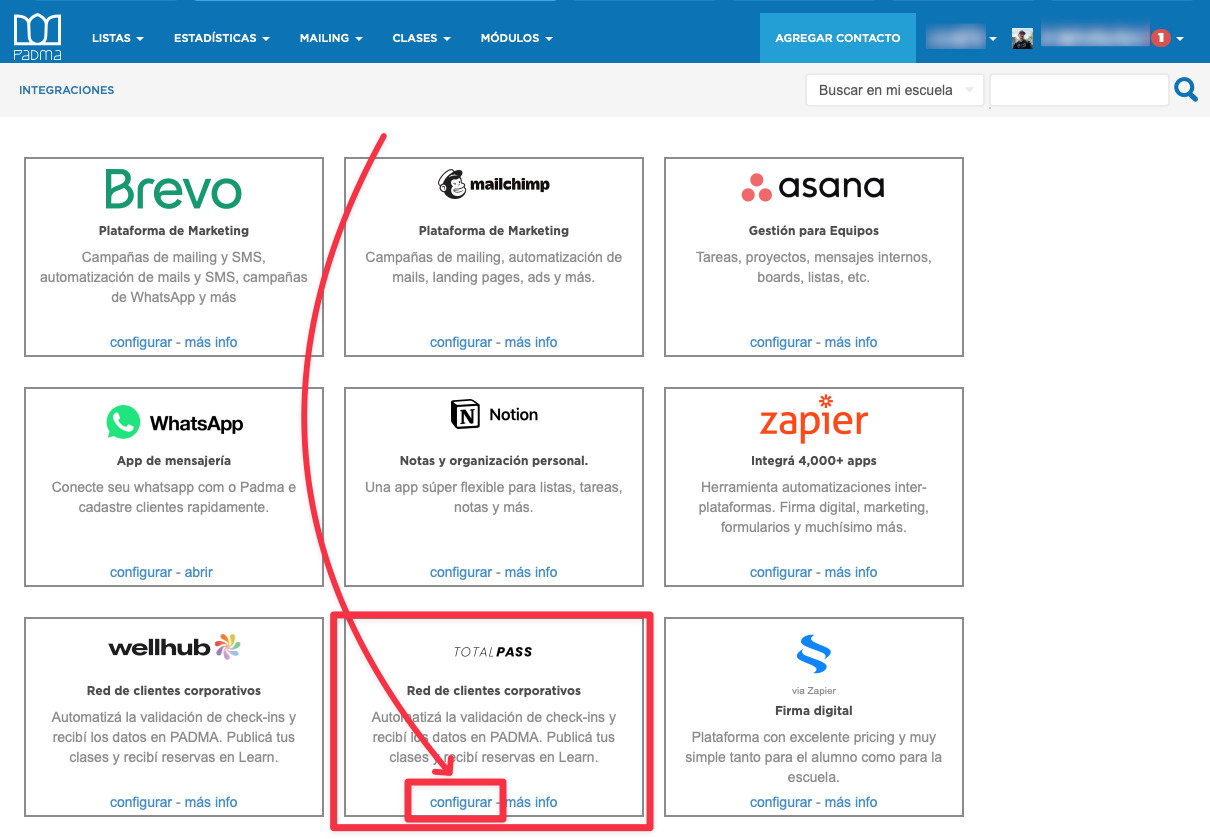
Go to

<a id="2813160bddf280ecaaacd4c10f2b4d01"></a><a id="2813160b-ddf2-80ec-aaac-d4c10f2b4d01"></a>

Modules > All integrations

<a id="2813160bddf280778e4afda78cfac759"></a><a id="2813160b-ddf2-8077-8e4a-fda78cfac759"></a>

<a id="1d83160bddf280fab919e0a52c507f7a"></a><a id="1d83160b-ddf2-80fa-b919-e0a52c507f7a"></a>

<img src="/help-assets/3b70de3c10182acb377310c3db3e517f7e06a6e5e05faafeb86bdfb7de92bd01.png" alt="CleanShot 2025-04-17 at 12.04.13.png">

<a id="1d83160bddf28054b7c1c7506e32b90f"></a><a id="1d83160b-ddf2-8054-b7c1-c7506e32b90f"></a>

# <a id="3---ingresse-a-api-key" data-help-heading="true"></a>3 - Enter the API KEY

<a id="1d83160bddf280868723ea61c8ea6663"></a><a id="1d83160b-ddf2-8086-8723-ea61c8ea6663"></a>

You need to enter the API KEY you copied in the first step

<a id="2813160bddf28048beebf892435da496"></a><a id="2813160b-ddf2-8048-beeb-f892435da496"></a>

> <a id="2813160bddf2803194a8c9ff7a406db3"></a><a id="2813160b-ddf2-8031-94a8-c9ff7a406db3"></a>
> 
> If the error “invalid API KEY” appears and you are sure you copied it correctly, try again. It may be that the Totalpass system was temporarily offline causing PADMA to consider the API key invalid.

<a id="2813160bddf28054bccdebfc95291cc5"></a><a id="2813160b-ddf2-8054-bccd-ebfc95291cc5"></a>