<a id="48daf344bffb483f9f4844360586415e"></a><a id="48daf344-bffb-483f-9f48-44360586415e"></a>

<a id="b5d846136f5b4abc8ff0b802eef22de9"></a><a id="b5d84613-6f5b-4abc-8ff0-b802eef22de9"></a>

# <a id="portugués" data-help-heading="true"></a>Portuguese

<a id="7a4ea58ec3cd4b7d843390cfb8d03e37"></a><a id="7a4ea58e-c3cd-4b7d-8433-90cfb8d03e37"></a>

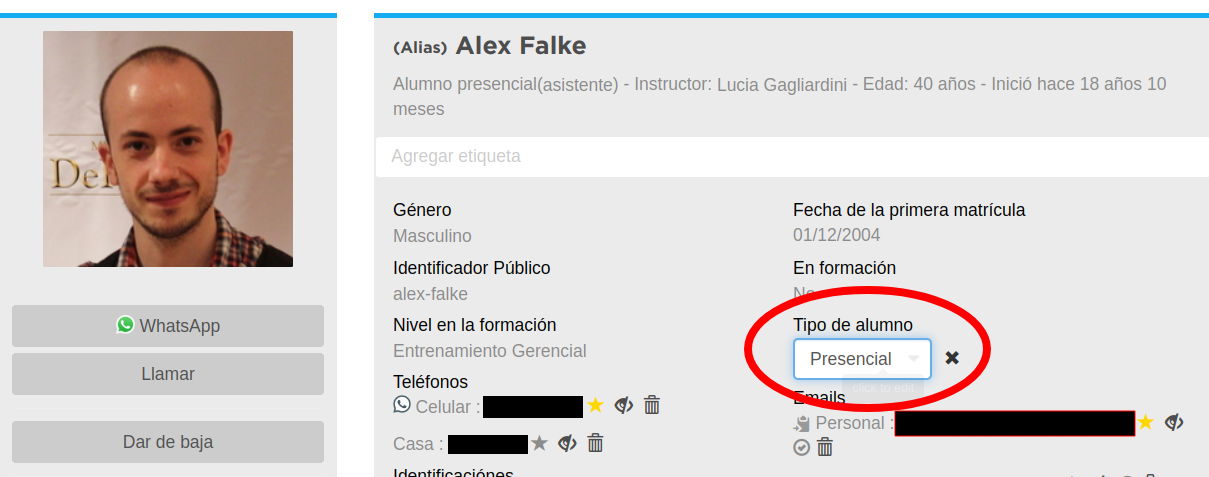
From now on, you have the option to categorize students by the type of access they have to your school: <strong>in-person</strong> and <strong>online-You can change this access type in two places, in the student profile, or in the lists</strong>.<br>Note.

<a id="855ca037faad480d801ed9b5bd314335"></a><a id="855ca037-faad-480d-801e-d9b5bd314335"></a>

<strong>you can only modify the “type of student” while the contact is a student</strong>: Student profile.

<a id="bf2040d55cec4afab2e29aec3ecfbeb4"></a><a id="bf2040d5-5cec-4afa-b2e2-9aec3ecfbeb4"></a>

## <a id="perfil-do-aluno" data-help-heading="true"></a>Expand the student's details and select the student type

<a id="c653f6d09d974b77b18c54c03f5fb58e"></a><a id="c653f6d0-9d97-4b77-b18c-54c03f5fb58e"></a>

Lists.

<a id="d0c485e9b8e84b83b544ce48b570538f"></a><a id="d0c485e9-b8e8-4b83-b544-ce48b570538f"></a>

<img src="/help-assets/15bcd9c677191d7e28c65dbcb2f2997e11cb9f4842e463bebad6ec73e01adaa8.png" alt="access_type_profile.png">

<a id="ed75acde70c848558bdace485ae70276"></a><a id="ed75acde-70c8-4855-8bda-ce485ae70276"></a>

<a id="4aab52741ae841cda36408675923597e"></a><a id="4aab5274-1ae8-41cd-a364-08675923597e"></a>

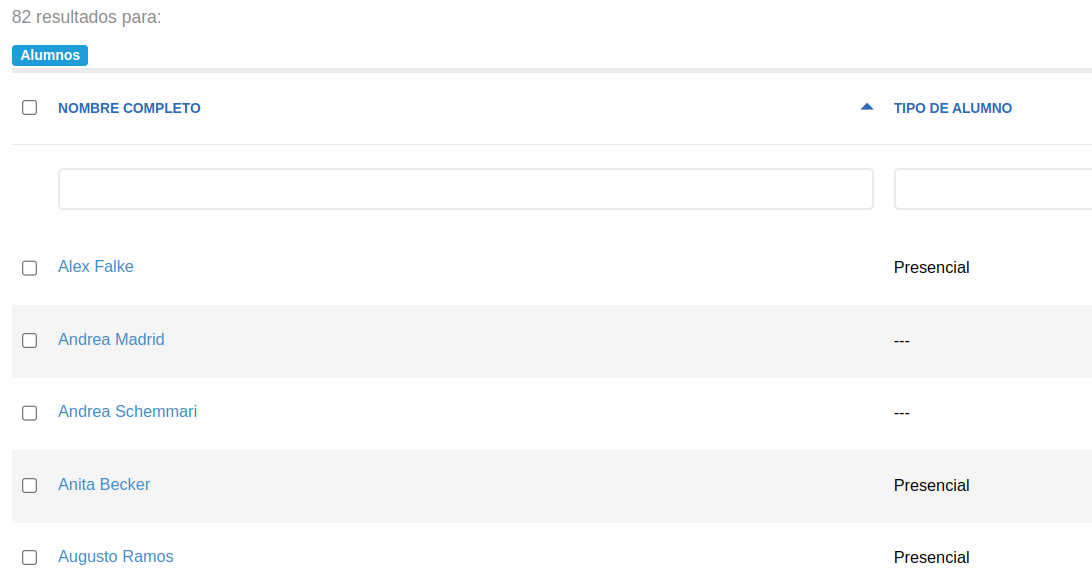
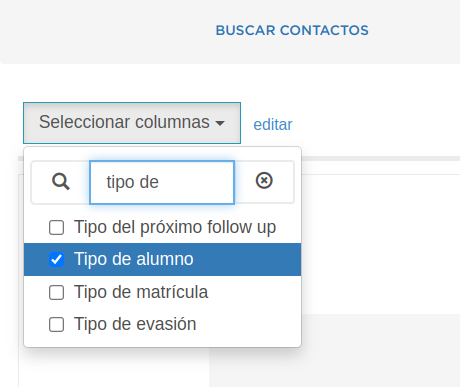
## <a id="listas" data-help-heading="true"></a>In a list, by opting to show the student type field, you can modify it directly from the list
<a id="a6ba9143c0d7432a926f29964aa2fe28"></a><a id="a6ba9143-c0d7-432a-926f-29964aa2fe28"></a>

<img src="/help-assets/03d606a6c62bfec16802cc6f802f62ef8836497b675ed26f7bd9704c2a425357.png" alt="Screenshot from 2023-09-25 10-27-21.png">

<a id="d0ee5632b3a9423db1fc80a8a99aa069"></a><a id="d0ee5632-b3a9-423d-b1fc-80a8a99aa069"></a>

<img src="/help-assets/78d86ae4bc91e0e20af445dcd93bdbee5f6737e5922bcdcf13b3ad3451cfd134.png" alt="Screenshot from 2023-09-25 10-27-51.png">

<a id="206040d4d3fd4ad9bde3a6b0580d0427"></a><a id="206040d4-d3fd-4ad9-bde3-a6b0580d0427"></a>

Statistics.

<a id="e74b37f96ebe4b158d2382fff3aa216d"></a><a id="e74b37f9-6ebe-4b15-8d23-82fff3aa216d"></a>

<a id="44e191244c34438d9c3cb9af13cfc89b"></a><a id="44e19124-4c34-438d-9c3c-b9af13cfc89b"></a>

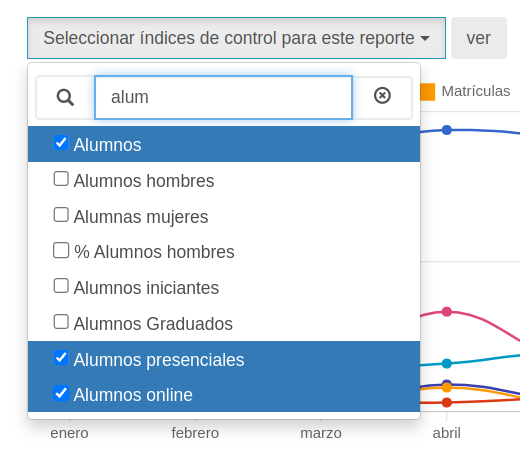
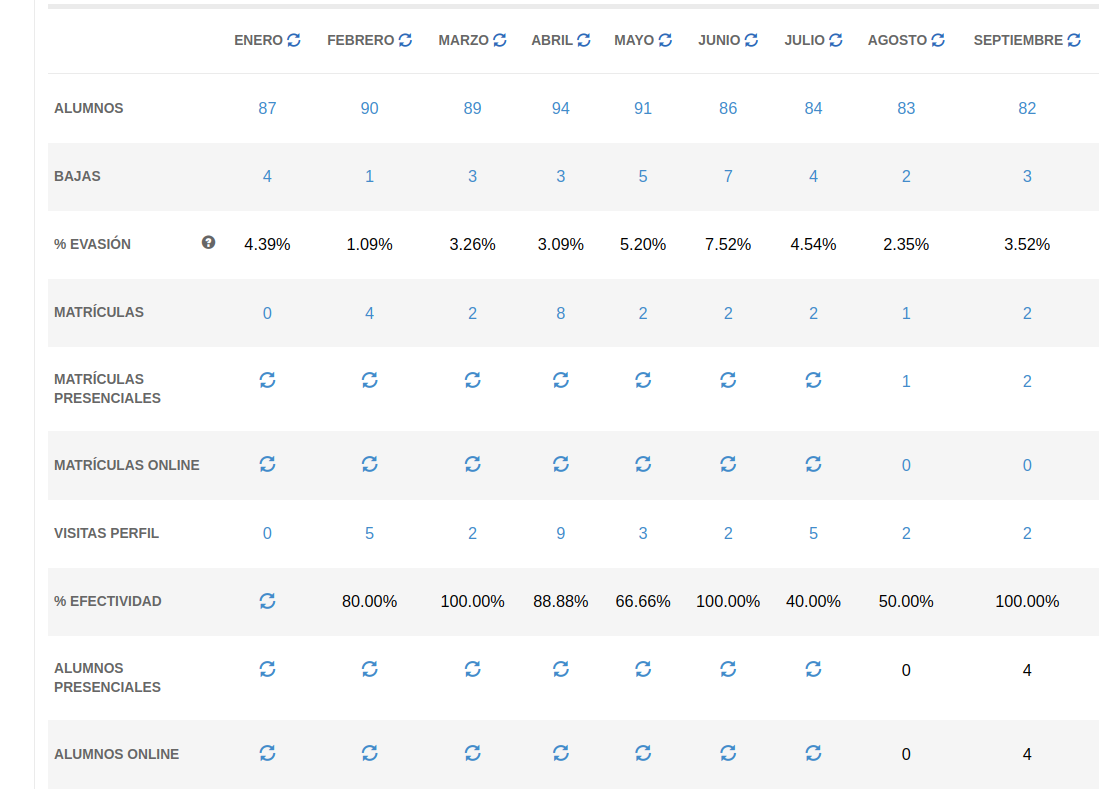
## <a id="estatísticas" data-help-heading="true"></a>In the statistics, you will be able to see how many students are online or in person

<a id="7a6e28067b25476eb6999f3872bacf61"></a><a id="7a6e2806-7b25-476e-b699-9f3872bacf61"></a>

Spanish-From now on you have the option to categorize students by the type of access they have to your school.
<a id="4c77bfbc0c104eb7bb81a3d2a29a4535"></a><a id="4c77bfbc-0c10-4eb7-bb81-a3d2a29a4535"></a>

<img src="/help-assets/82961ac571e5548edf186251d34d89a3159828e329ffc4b06f39119fb9ea039a.png" alt="Screenshot from 2023-09-25 10-40-42.png">

<a id="8873d1d782334864b106f4dfa7bb4fdf"></a><a id="8873d1d7-8233-4864-b106-f4dfa7bb4fdf"></a>

<img src="/help-assets/9fe4a83e6195a5030a1ec49f3030dcbb3b8a3a82d5c000f3b73ef61937b5b697.png" alt="Screenshot from 2023-09-25 10-41-10.png">

<a id="94c633ed514747c1a780fde206e7c371"></a><a id="94c633ed-5147-47c1-a780-fde206e7c371"></a>

# <a id="español" data-help-heading="true"></a>in-person

<a id="0964052d922a412b95c00707b6369d8d"></a><a id="0964052d-922a-412b-95c0-0707b6369d8d"></a>

and: <strong>online</strong> You can modify this access type from two places <strong>the student profile or the lists</strong>.<br>Note: only the access type of students can be modified.

<a id="f75ecb05b51c44599e0d668f601e6a10"></a><a id="f75ecb05-b51c-4459-9e0d-668f601e6a10"></a>

<strong>Student profile</strong>: In the profile, by expanding student details and selecting the student type

<a id="47af0cba4da54786baf54dfe6ef9018c"></a><a id="47af0cba-4da5-4786-baf5-4dfe6ef9018c"></a>

## <a id="perfil-del-alumno" data-help-heading="true"></a>Lists

<a id="ef4be873f6f54370a6f5f546297921b7"></a><a id="ef4be873-f6f5-4370-a6f5-f546297921b7"></a>

<img src="/help-assets/15bcd9c677191d7e28c65dbcb2f2997e11cb9f4842e463bebad6ec73e01adaa8.png" alt="access_type_profile.png">

<a id="340cf8cb5650483b8defe714564709d3"></a><a id="340cf8cb-5650-483b-8def-e714564709d3"></a>

From a list, choosing to show the student type field, you can modify it directly from the list<br>

<a id="50faea02f7a14b8a8353963a2afd8d1d"></a><a id="50faea02-f7a1-4b8a-8353-963a2afd8d1d"></a>

## <a id="listas-1" data-help-heading="true"></a>Statistics

<a id="4f70fbba57c84de5ab130c2633c4679a"></a><a id="4f70fbba-57c8-4de5-ab13-0c2633c4679a"></a>

<img src="/help-assets/03d606a6c62bfec16802cc6f802f62ef8836497b675ed26f7bd9704c2a425357.png" alt="Screenshot from 2023-09-25 10-27-21.png">

<a id="c7e97e3900b6464d8b71e01a7cd5eee2"></a><a id="c7e97e39-00b6-464d-8b71-e01a7cd5eee2"></a>

<img src="/help-assets/78d86ae4bc91e0e20af445dcd93bdbee5f6737e5922bcdcf13b3ad3451cfd134.png" alt="Screenshot from 2023-09-25 10-27-51.png">

<a id="de9c79b865004b34ac22930c3a6350fc"></a><a id="de9c79b8-6500-4b34-ac22-930c3a6350fc"></a>

In the statistics you will be able to see how many students are in-person or online type..

<a id="72697acce30f465a84701bb055dee7a1"></a><a id="72697acc-e30f-465a-8470-1bb055dee7a1"></a>

<a id="b74178bd5f0d4ea8aadcd7af9e3dca30"></a><a id="b74178bd-5f0d-4ea8-aadc-d7af9e3dca30"></a>

## <a id="estadísticas" data-help-heading="true"></a>Statistics

<a id="0c6b33cd492946c69c95b215a599b5da"></a><a id="0c6b33cd-4929-46c6-9c95-b215a599b5da"></a>

In the statistics you will be able to see how many students are in-person or online..

<a id="b2f8b7fde43a468ca01a3b3400a828f9"></a><a id="b2f8b7fd-e43a-468c-a01a-3b3400a828f9"></a>

<img src="/help-assets/82961ac571e5548edf186251d34d89a3159828e329ffc4b06f39119fb9ea039a.png" alt="Screenshot from 2023-09-25 10-40-42.png">

<a id="a9f093752ae1432eba51ba6a3d50bd98"></a><a id="a9f09375-2ae1-432e-ba51-ba6a3d50bd98"></a>

<img src="/help-assets/9fe4a83e6195a5030a1ec49f3030dcbb3b8a3a82d5c000f3b73ef61937b5b697.png" alt="Screenshot from 2023-09-25 10-41-10.png">